Home
Digital TV Digital TV Info
Digital TV Sets
Buy Remotes
Portable Digital TVs
Digital Recorders
DVD Players
Blu-ray Disc
Satellite Television
3D TV is Here!
Google TV
Roku + Netflix!
Mobile Digital TV Mobil Digital TV Info
Mobile DTV Devices
Mobile DTV Stations
Digital Transition What is theTransition?
Am I Affected?
Antenna Information
Buy Antennas
Is Cable Affected?
RVs and Digital TV
Computers & DTV
Q & A
Converter Boxes Converter Box Info
Converter Retailers
Convert. Box Manuals
Coupon Program
Resources Reference Links
Digital Definitions
Website Info EZ Blog / News
EZ Newsletter
Site Map
Contact Us
Advertise With Us
Support Our Site
Related Topics Digital Radio
Kindle Books

[?] Subscribe To This Site

XML RSS
Add to Google
Add to My Yahoo!
Add to My MSN
Subscribe with Bloglines

Can I Use My Old Portable TV With a DTV Converter Box?
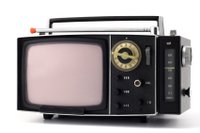
Old Portable TVs: Step by step instructions for using your portable analog set with a DTV Converter Box.

FYI: a little bit of technical "do-it-yourself" ability may be required.

Depending on the features of your portable TV set, the connections will vary.

Components required: Antenna, DTV converter box and a portable TV set with audio/video inputs.

Note: The antenna on your old TV set cannot be attached to the DTV converter box and is useless. You will need a separate antenna to connect to the DTV converter box.

Audio/Video (A/V) type connections:
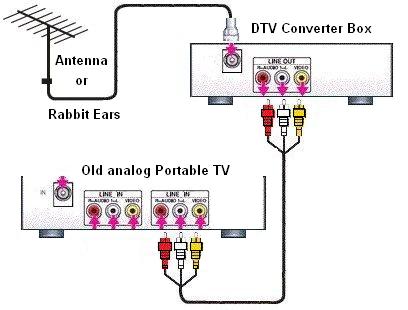
  • Connect an antenna (external rabbit ears or outside antenna) to the RF input of the DTV converter box.
  • Connect the A/V outputs on the converter box to the A/V inputs on the portable TV set using an RCA A/V cable.
  • Switch the TV to A/V input and adjust the converter box for the channel desired.

    (See the connection diagram for clarification)


    Google


    Return from Old Portable TV to EZ Digital TV Home Page

    Disclaimer

    Help Support Our Site