Directions for connecting a 12-volt powered converter box using a 12-volt power source.
Just like your car, many RVs, trailers, and boats have a 12-volt power supply available. If you want to use a converter box in one of these vehicles, the easiest way to accomplish this is to buy a 12-volt converter box.
We will be using the Artec brand converter boxes that are powered by 12 volts to use in this illustration.
Either of these boxes (that you can order online) will work with this method: Artec T3AP-LL or Artec T3AP
These boxes also have analog pass-through which is good for digital and analog broadcasts especially when traveling.
To connect your converter box to a 12-volt power system using a cigarette lighter style receptacle:
If your vehicle has a cigarette lighter type plug, this is an EZ way to connect a 12V converter box.
Items needed:
Analog TV
Antenna
12V Converter Box
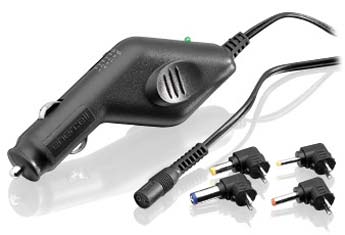
Universal Vehicle DC to DC Adapter (RadioShack #273-1811)
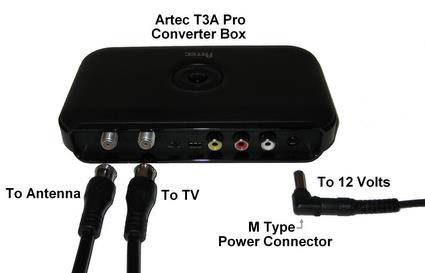
Connect the 12-volt power cord (using the M-type adapter that comes with the power cord) to the "DC IN 12V" port on the Converter Box and plug the other end into a cigarette lighter style receptacle.
Connect the cable from the antenna to the "RF input" of the Converter Box.
Connect the Coax cable that came with the converter box to the "RF output" of the converter box.
Connect the other end of the coax cable to the television "RF Input".
Tune the TV to channel 3 or 4 (whatever the box is set to).
Change channels using the remote control that came with the converter box.
Enjoy Digital TV
To connect your converter box to a 12-volt power system by hardwiring:
If your vehicle does not have a cigarette lighter style receptacle, it will require some electrical knowledge and soldering skills.
Items needed:
Analog TV
Antenna
12V Converter Box
Size M Coaxial DC Power Plug (2-Pack) - Solder Type (RadioShack #274-1569)
Two Conductor 20awg–22awg wire
Solder one end of the wire to the Size M Coaxial DC Power Plug: Be careful to observe polarity. The inner portion of the plug tip is positive the outer part is negative.
Connect the other end of the wire to your 12V system and again be careful to observe polarity. Note: RED is positive, BLACK is negative.
Connect the cable from the antenna to the "RF input" of the Converter Box.
Connect the Coax cable that came with the converter box to the "RF output" of the converter box.
Connect the other end of the coax cable to the television "RF Input".
Tune the TV to channel 3 or 4 (whatever the box is set to).
Change channels using the remote control that came with the converter box.
Enjoy Digital TV!
Please note: If you use a converter box other than the Artec brand, you may need to buy the connectors and plugs that will fit that box and use these directions.