Digital Reception Problems
ReceptionTips
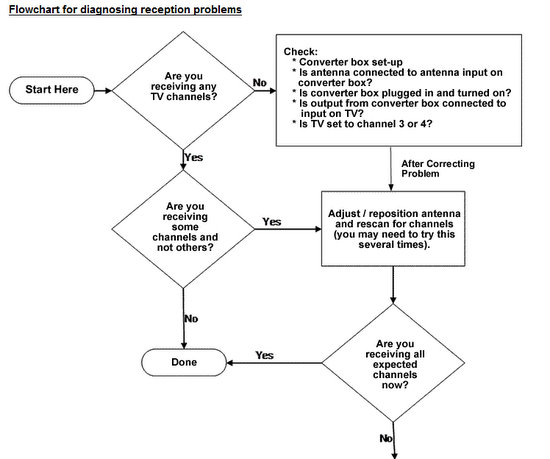
- Digital TV reception can often be improved just by changing the location of your current antenna, even as little as a few inches. For example, moving it away from other objects or placing it higher or lower can improve reception. Be sure to move the antenna slowly as digital TV tuners need a little time to properly detect the signal. You need to rescan for available signals if you are missing channels.
- Antennas typically need to be oriented or "aimed" to get the best signal from the desired station. While adjusting your antenna, it may be helpful to access the "signal strength meter" to determine whether your adjustments are improving the signals' strength. The signal strength meter is usually accessed through the menu feature on your remote control. Refer to the owner’s manual of your device for detailed instructions on how to access its signal strength meter.
- Remember to do another channel scan after you have adjusted your antenna. For outdoor antennas, a rotor that re-orients the antenna can improve performance, particularly when trying to receive stations that transmit from different locations.
- If you are unable to get satisfactory reception with your current indoor antenna, you may wish to add a clip-on bow-tie element or obtain a combination indoor antenna that includes features for reception of both VHF and UHF signals and/or an amplifier to boost the received signal. Types of antennas
- Generally, an outdoor antenna will get better reception than an indoor antenna.
- If you are near a station’s broadcast tower, reception of that station, as well as other stations, can be impeded by signal "overload."
- If you decide to replace or upgrade your outdoor antenna, websites such as www.antennaweb.org can provide information on the locations of broadcast transmitters and the types of outdoor antennas appropriate for the stations you wish to receive. If you need assistance with upgrading your antenna system, check with a local antenna retailer or antenna installer.
Problems with your converter box reception?
If you are having problems with your converter box and digital reception, please take a look at the flowchart and tips below. Also check out our
How to rescan your converter box and Antenna Information pages.
Return from Digital Reception to EZ Digital TV Home Page