Analog Pass-Through Feature
A converter box with analog pass-through
allows you to receive any stations that still broadcast in analog, including
programming from U.S. Low-Power TV, Class A, and translator stations that are not required to switch to digital transmission.
The analog broadcast signals pass through the converter box to be tuned by your
analog TV.
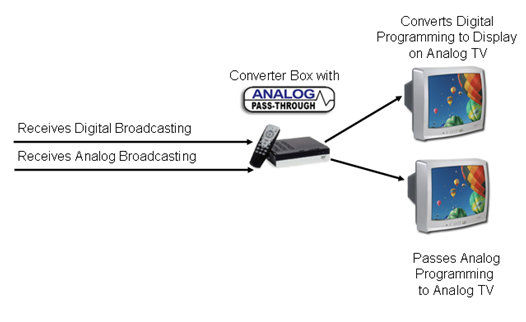
If you want to be able to watch channels from both analog and digital TV stations, you may want to buy a converter box that will allow the analog signal to pass through to your TV set.
If you do not purchase a converter box with an analog pass-through feature, you may have to physically disconnect the box every time you change from a digital channel to an analog channel.
RV Owners: A converter box with an analog pass-through is a great choice while traveling. It will allow you to receive TV signals from various TV stations whether they are transmitting in analog or digital.
RVs and Digital TV
How to receive analog channels without an
"analog pass-through" converter box:
You don't have to disconnect the converter box every time you switch from a digital to an analog channel.
If you have sufficient signal from your antenna and your television has an audio/video input, you can use a DTV converter box without an analog pass-through.
Here’s how:
Use a 2-way splitter to split the signal coming from your antenna. Connect the antenna to the input side of the 2-way splitter, connect your converter box to one of the outputs of the 2-way splitter. Connect the other output side of the 2-way splitter to the RF (antenna in) on your television.
Next, connect the audio/video output from your converter box using an audio/video cable to the audio/video input of your television.
To watch digital programming, switch your television to video input and change channels on your converter box. To watch analog programming, change the channels on the television set.
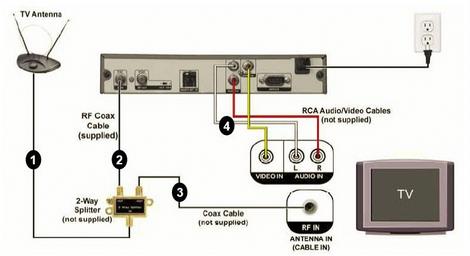
Another option is to use an A/B Switch instead of a 2-way splitter. The only difference is you will have to use the A/B Switch to switch the antenna signal from the converter box to the television when you want to switch from a digital channel to an analog channel.
Return to EZ Digital TV Home Page